 Time Capture

-
Food Safety Conference 2024
2 years ago
Ostendo provides scanning and traceability insights to Queensland food manufacturers and distributors.

It's been said that good things take time. With Time Capture, you can find out exactly how much time, and how that time is being used. So you can make more good things with your time.
Time Capture is really easy to use for attendance. It records start and end times, and can automatically deduct lunch breaks or have them entered manually. Users can punch in with a barcode ID or other auto-id system. No more manual entry for your attendance records. No more time wasted decoding handwriting. No more manually editing lunch break times.
Recording start and finish times for jobs can be picked up by operators within as little as 15 minutes of use. Barcodes on the job sheet let users select their job quickly. Jobs can also be pre-assigned by supervisors for workers to select using a touch screen, barcode or mouse and keyboard. That way, the next assigned task is clear at all times.
Time Capture can balance time spent between multiple simultaneous jobs. Time can also be tracked against machines, even if each operator uses multiple machines simultaneously. These two features deliver unprecedented time-measurement precision for a standard time and attendance package in Time Capture's price range.
Each of the three pillars of the Time Capture UI - Touch, Barcode, and Mouse & Keyboard - can be used in all parts of the program. Each has its unique strengths:
- Mouse and Keyboard: for the office environment where Time Capture is used as a desktop application. A design office, for example.
- Barcode Scanner: for the dynamic shop floor, where it's convenient to pick up and scan then move on.
- Touch Screen: for sanitised environments, such as in the food industry, where it's important to have a low number of easy-to-clean input surfaces.
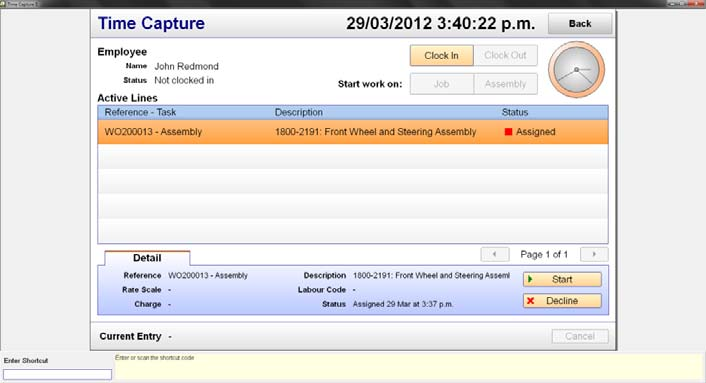
In short, you’ll be able to perform accurate job costing without the hassle of manually operating a paper system, or combining many disparate systems. Our automated data collection will take care of the work for you.
Time Capture Overview
(Click on the YouTube button to increase the screen size)
For more information, check out the Time Capture features guide or email
If you are upgrading to Ostendo Continuum contact us to get your upgrade files and guides or use the downloads below:
Downloads
Note : "Time Capture Update Files" are for the Generic Version.
Time capture versions V15 and greater are compliant with the current 242 version of Ostendo and the new 2026 Continuum release.
For compliance with the Ostendo Continuum release the Time Capture set up script has been removed from the custom data screen programme and needs to be run separately when Ostendo is in single user mode.

Version Log
2026-04-22 v15.0 - Continuum & 242 compliant
==================================================
- Moved setup code from the datascreen into a standard script
- Changed setup to use execute-block for setup steps, giving transaction-like behavior in Ostendo 243
- Resolved warnings from Ostendo 243 "Verify Scripts" function
- Miscellaneous changes for compatibility with Ostendo 243
- Minor UI changes
2026-03-26 v14.3
==================================================
- Fixed resuming a held line would ignore parallel work policies to hold or finish existing work
2026-02-18 v14.2
==================================================
- Employee-specific timesheets now set the timesheet entries-by to that employee
2026-02-03 v14.1
==================================================
- Added basic preview screen when loading the datascreen in Ostendo 243+
- Updated setup code for compatibility with Ostendo 243/Firebird 5
2025-12-19 v14.0
==================================================
- Added "Individual Timesheets" department setting which gives each employee their own timesheet
- Changed department settings edit view to initialize new records from the "<default>" department
Recent
| AUCKLAND | MELBOURNE | BRISBANE |
|
9 Huron Street, |
L3, 19 Bank Place, |
76 Brunswick Street, |
|
Ph: +64 9 446 1204 |
Ph: 1800 764 058 |
Ph: +61 497 100 500 |